Zalo numbers that belong to the company, not to an employee's phone
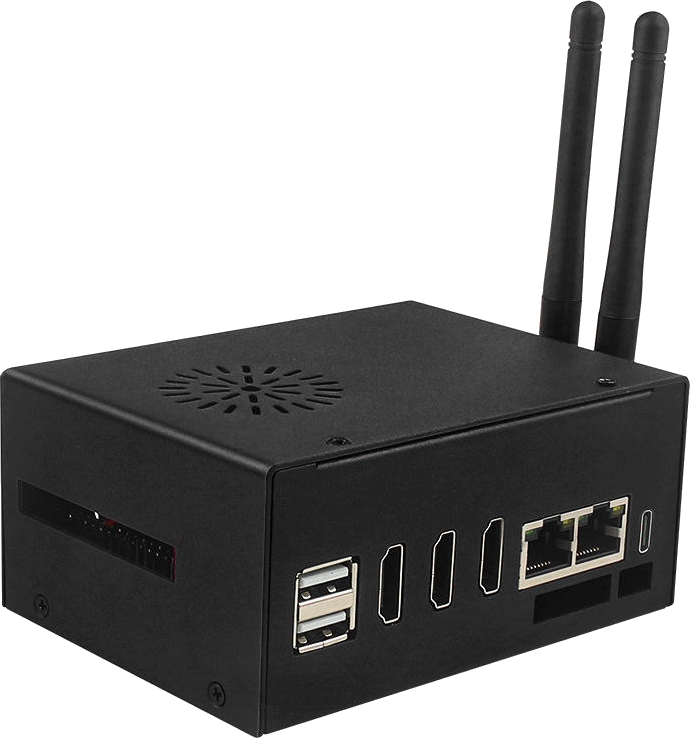
In Vietnam, customers message on Zalo before they call. MagicBox gives each Zalo number its own company-managed Android phone: staff chat and call from the PC, managers can see every conversation, and when someone leaves, the number and customer history stay.
Who uses MagicBox for Zalo?
The four most common setups, what MagicBox handles for you and a sample configuration for one box.
A company Zalo number per rep
Each rep gets a company-owned Zalo number, used from the PC. Managers can review conversations; when ownership changes, just hand the phone to the new rep.
- Send price lists, photos and documents
- Book viewings, test drives and signings
- Hand over numbers and customers when staff change
Customer care and orders
Customers message on Zalo to ask about products, send reference photos and order. Several support staff handle the shop's numbers from their computers.
- Answer product questions, send photos and catalogues
- Confirm orders and send tracking codes
- Payment reminders and after-sales care
Manage Zalo groups
Run many Zalo groups for classes and customer communities: post announcements, approve members, answer questions and post to the timeline regularly.
- Post announcements and schedules to groups
- Approve members and answer questions
- Post timeline updates about courses and products
Video consultations
Consultants make Zalo video calls to customers right from the computer using the built-in camera, mic and speaker — no clinic phone to pass around.
- Video consultations and check-ins
- Send appointment and follow-up reminders
- Send quotes and aftercare instructions
From familiar headaches to a cleaner way of working
What you're facing
Staff leave with your customers
Sales reps use Zalo on personal phones — when they quit, the customer list and chat history go with them.
Managers are blind
Customer messages are scattered across phones; managers can't tell who is waiting for a reply or who gave wrong advice.
A drawer full of phones
One phone, charger and SIM per Zalo number — lost phones, dead batteries and mix-ups every day.
How MagicBox solves it
One phone per number
An isolated Android phone for each Zalo number, with its own identity and IP, running the official Zalo app.
Direct calls
Camera, mic and speaker connected out of the box — voice and video calls like a real phone.
Remote control
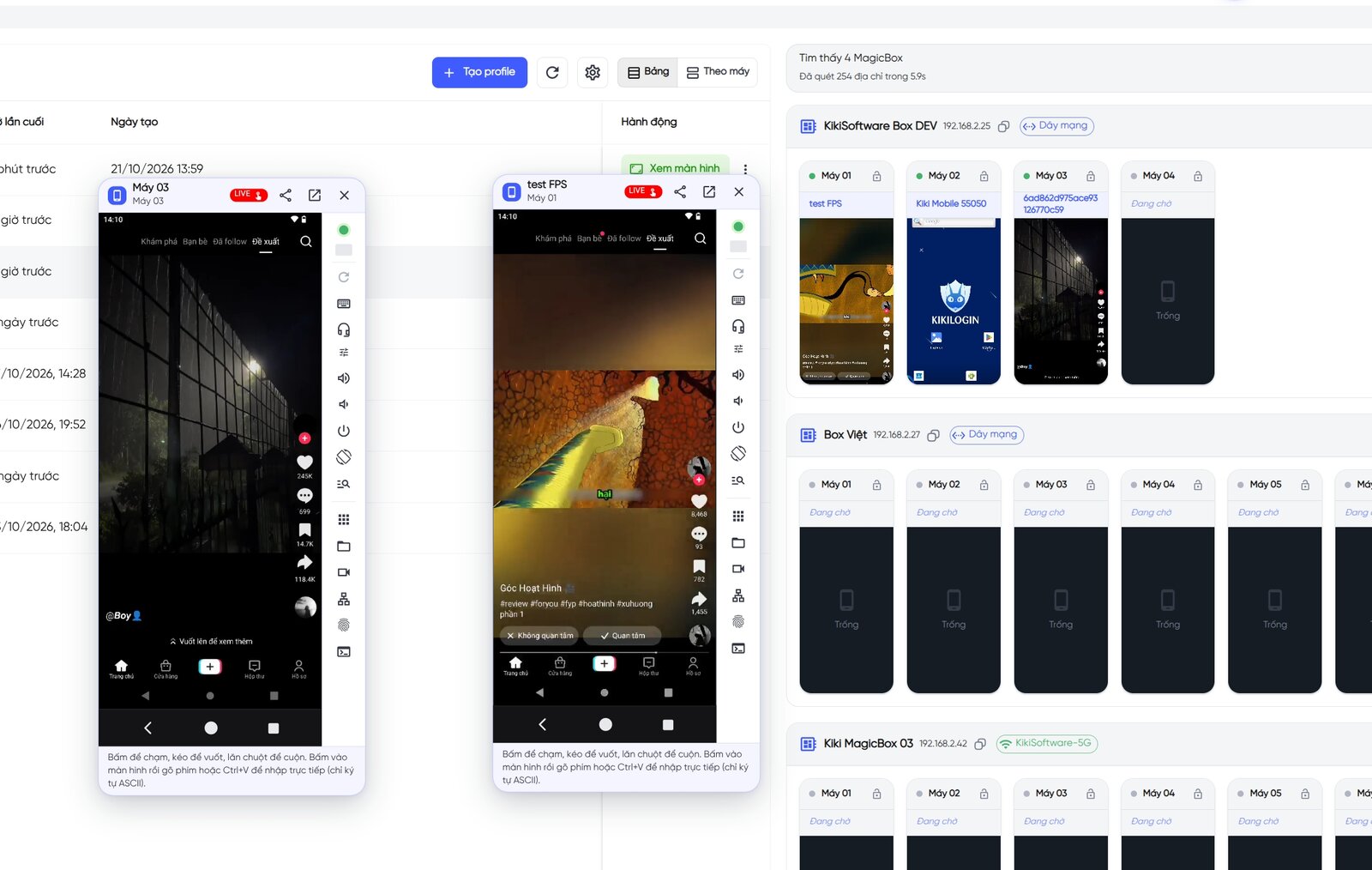
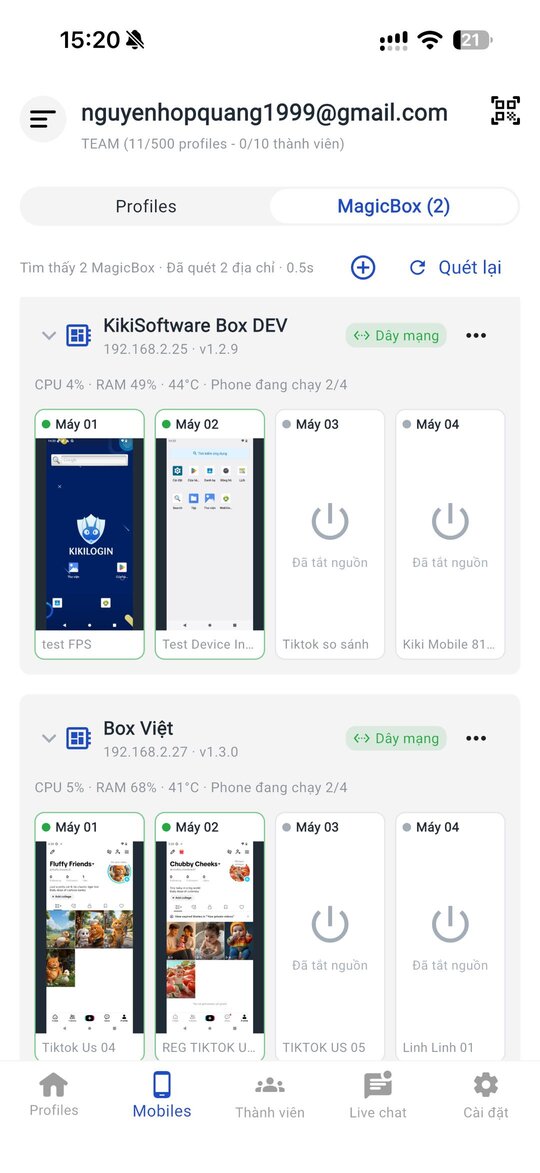
Staff view and control each phone from PC or mobile, without holding a device.
Data stays with you
Phones and chat history live in the company's box and can be backed up — changing staff doesn't lose customers.
A day of operations with MagicBox
AI and schedules handle the repetitive work; your team only does what needs a human.
-
08:00
Shift starts
Staff open the control app on their PCs; each handles their assigned Zalo numbers.
-
09:00
Timeline posts
Post updates about new products and promotions from company numbers.
-
10:00
Chats and calls
Reply to messages and make voice and video calls right from the computer.
-
17:30
Manager review
Managers open each phone to review conversations and spot unanswered customers.
-
After hours
Stay active
Numbers stay online in the box with steady activity to keep them healthy long term.
Your whole support team on one box
Every Zalo account lives in the control app: view screens, chat and call right from the PC. Monitor boxes and phones in real time.
- Zalo numbers owned by the company, not staff
- Serve customers across accounts
- Direct voice and video calls
One MagicBox.
4-5 Android phones.
15M VND, paid once.
Includes software, proxy router, camera/mic/speaker, AI and OTA updates. 6-month warranty.
MagicBox for Zalo
Can't find your answer? Message the KikiLogin team on Zalo/Hotline 0338.83.83.99.
Can I make Zalo calls on MagicBox?
Yes. Every phone has a camera, mic and speaker connected, so you can make voice and video calls through the control app.
How is this different from Zalo PC?
Zalo PC needs a phone to log in and suits one account per computer. With MagicBox, each Zalo number has its own Android phone inside the box that any assigned staff member can open through the control app.
Does my team need to sit next to the device?
No. Staff control each phone remotely from the PC or mobile app.
What happens when an employee leaves?
The Zalo number and chat history stay on the phone in the company's box. Just assign that phone to the new person.
Can I use the official Zalo app?
Yes. Install Zalo on a MagicBox Android phone and use it like a normal phone.
Other solutions
Sell on Marketplace across regions, warm admin accounts for ads, manage pages and groups, and sell live.
See solutionTikTok & TikTok Shop
Run niche affiliate channels, satellite channels for your shop, cross-border channels and overnight lives.
See solution24/7 Livestream
Fill overnight slots, stream to several platforms at once, use AI Avatar hosts and run product tours non-stop.
See solutionProduct-line channels for brands, client accounts for agencies, niche Reels pages and international channels.
See solution